I Tried to Make a Coloring Book Game in Godot as a Beginner — Here’s What Happened

I’m just three months into learning game development, and I wanted to share the journey of making my latest project: Rang – Zen Coloring Book Game. This was my first time trying to build a coloring game, and honestly, it came with a lot of challenges, experiments, and small victories along the way. (make a coloring book game)
The Idea
I always had this thought in my head: “Could I make a coloring game?”
I didn’t know how at first, but the idea just wouldn’t leave me. So I decided to give it a shot.
I asked AI tools (ChatGPT and DeepSeek) whether it was even possible in Godot, and after getting a working prototype where I could color on a white background — and even run it on Android — I got the confidence to push forward.
The Coloring Mechanism
The first big challenge was making only the right parts paintable:
- White parts should get colored.
- Black outlines should stay untouched.
- Transparent pixels should be handled differently.
It worked in the end, but then came the issue of anti-aliasing. Basically, I was seeing thin white borders between the color and the black outlines. Dark colors made this super obvious.
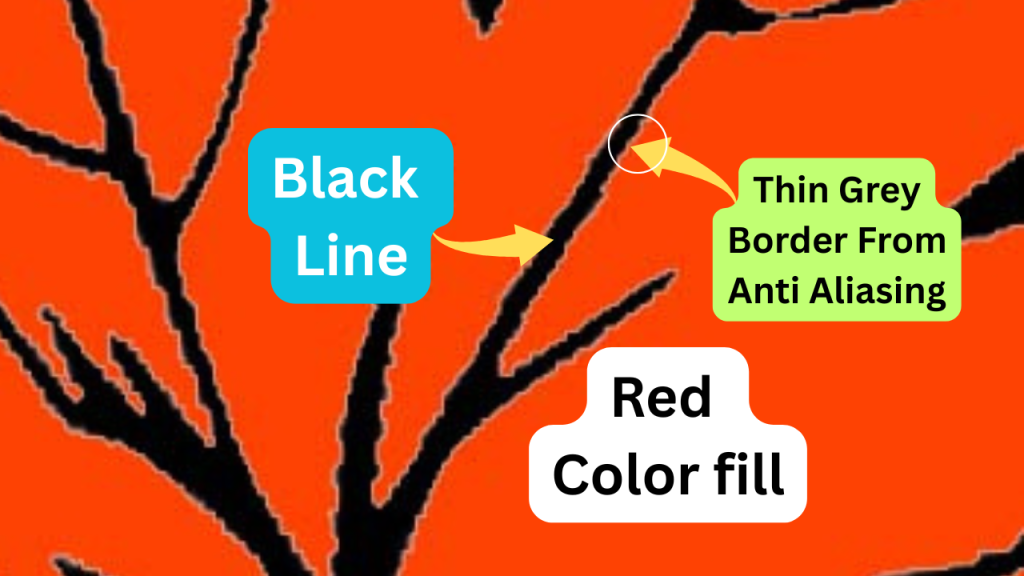
My workaround:
- Keep the color palette lighter and pastel-like.
- Create line art with as little anti-aliasing as possible.
Not perfect, but good enough for a chill coloring game.
Comparing Player Coloring With the Original (make a coloring book game)
I wanted a way to give feedback, so I built a star system:
- Resize both images (original + player’s) to 64×64 pixels.
- Compare pixel by pixel with thresholds.
- Ignore transparent areas.
- If it’s around 80% accurate, you get 3 stars.
Simple, but effective.
The Pen Stroke ASMR Sound Struggle 🎧 (make a coloring book game)
This part nearly made me give up. I thought it would be easy — just play a pen sound when dragging, right? Nope. It sounded robotic, repetitive, or sometimes didn’t play at all because the audio had silence at the start.
After three days of testing, the final solution was:
- Use different stroke sounds (short, medium, long).
- Track drag speed → slow drag = long sound, fast drag = short sound.
- Add small random pitch variations to keep it natural.
- Prevent overlapping until a sound finishes.
Still not 100% perfect, but much better. And I learned a LOT about sound design.
Organizing Into Color Books (make a coloring book game)
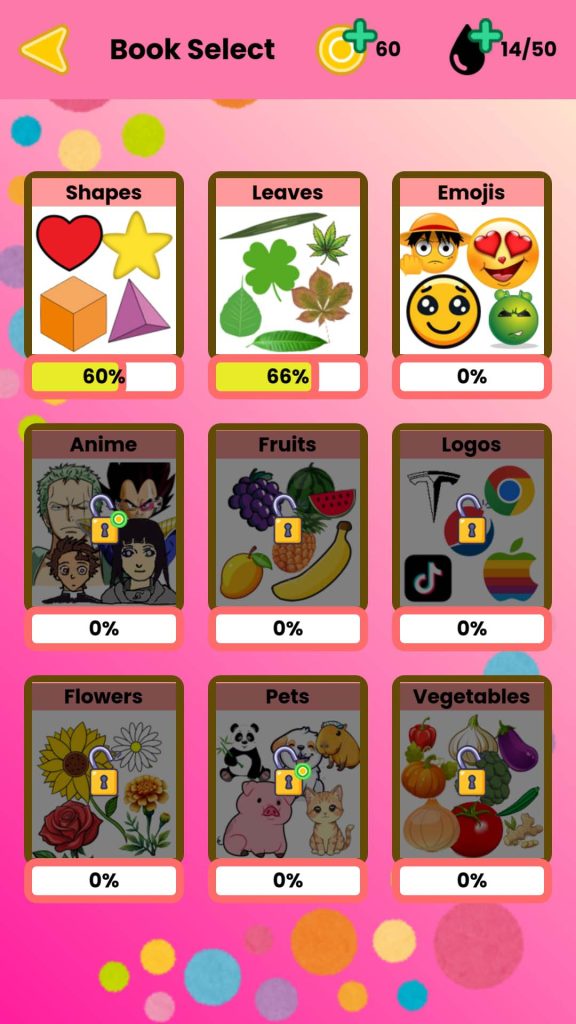
Instead of just random line art, I created Color Books as categories (like a Shapes book with circle, square, heart, etc.).
This is where I discovered the power of custom resources in Godot. It made organizing and reusing content way easier, and honestly it was one of the most fun parts of the project.
Wrapping Up (make a coloring book game)
Making Rang: Zen Coloring Book Game taught me so much:
- Handling image manipulation in Godot.
- Dealing with anti-aliasing.
- Creating a star comparison system.
- Sound design headaches.
- Using custom resources to structure content.
It’s not perfect, but I’m proud of it. Three months ago I didn’t even think I’d be able to make a game like this, and now it’s actually playable on Android. That’s a huge win for me.
Thanks for reading — and if you’ve made it this far, I’d love to hear what you think!
Similar Blogs:


Post Comment